Commvault Cloud Cloud SaaS trials use a credit-based system to give you flexibility and transparency during your evaluation period. Instead of committing a fixed amount of storage or capacity upfront, you receive a pool of credits at the start of your trial. Every backup or restore operation consumes credits, and you can always see how much of your trial allowance remains.
When you sign up for a trial, you receive 30,000 credits valid for 30 days. These credits function much like AWS credits: they apply automatically as you use the service, and you cannot request additional credits once they are consumed. The free trial ends either when all 30,000 credits are used or when the 30 days expire, whichever comes first.
Consuming credits
Credits are automatically deducted each time you perform an operation in Commvault Cloud Cloud. The number of credits you use depends on the workload type, the operation, and the region where the workload resides.
For example, protecting a Cloud Native Database workload in Tokyo consumes slightly more credits than in Virginia because regional pricing is included in the Full Effective Terabyte (FETB+) rate card.
Each operation type (such as Silver, Cross-region copy, or Extended retention) has a defined credit cost per FETB+ of data protected or managed. For instance, in the U.S. region, Cloud Native Database Silver consumes 3,000 credits per FETB+, while Cross-cloud copy consumes 10,500 credits per FETB+. In the APAC region, the same operations consume 3,450 and 12,075 credits per FETB+, respectively, reflecting regional cost adjustments.
Tracking your usage
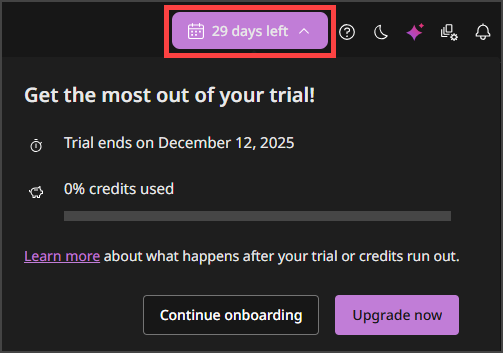
To help you stay on top of your trial, Commvault Cloud Cloud shows your remaining credits and the number of days left directly inside the application. At the top right of the screen, you see a banner displaying your trial status with days remaining. Select this banner to open a panel with detailed information, including how many credits you have consumed and how many remain. This visibility makes it easy to understand how your trial is progressing and to estimate how quickly your credits are being consumed.
When credits expire
Your free trial ends when either your credits are fully consumed or your 30-day period ends. At that point, backup operations pause automatically and restore capabilities disable. Your data remains protected in Commvault Cloud Cloud storage. You cannot perform new operations until you upgrade to a paid subscription.
Upgrading after trial
If you decide to continue after your trial, you can upgrade directly within the product. Once you upgrade, your usage transitions from trial credits to a billable, pay-as-you-go model in AWS or Azure Marketplace. This unlocks the full set of Commvault Cloud Cloud SaaS capabilities, including advanced workloads, longer retention policies, and cyber resiliency features such as cleanroom recovery. Trial credits are promotional and do not roll over into a paid plan. Your paid subscription starts fresh, with consumption billed according to your usage in the Marketplace.
Trial limits
-
The trial includes 30,000 credits. If you use them before the 30 days are up, the trial ends.
-
Your data remains in Commvault Cloud Cloud after the trial, but backup and restore operations are disabled. You must upgrade to resume protection and recovery.
-
Unused trial credits do not transfer into a paid plan.