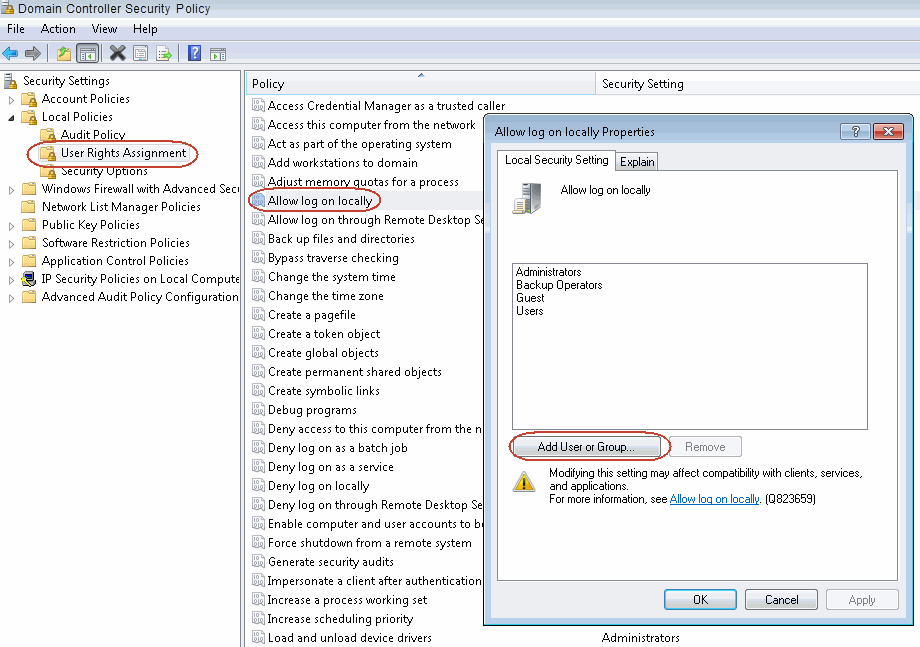
A CommCell administrator can view or modify user rights assignment on a domain controller. By adding a user or user group to a selected policy, you can allow that user or group certain rights and permissions associated with that policy. You can also restrict permissions by removing a user or user group from a policy. For example, administrator can allow only Backup Operators group to change the system time.
Procedure
Follow the steps below to view or modify user rights assignments on a domain controller:
-
Click Start > Settings > Control Panel > Administrative Tools.
-
From Administrative Tools\Domain Controller Security Policy, expand the tree to Security Settings, Local Policies, and User Rights Assignment. Add the user to all the required rights (logon as service, backup, restore).