When configuring interfaces with Active-Backup bonding, it is critical to verify that the bond is working correctly. A misconfigured bond can cause installation failures during later steps or result in production outages after deployment.
Use the following steps to verify that the bond is working correctly:
-
Run the following command:
cat /proc/net/bonding/<bond interface>For example:
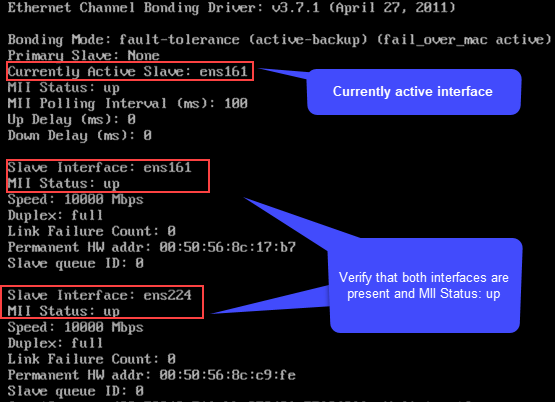
cat /proc/net/bonding/bond1You should see output similar to the following:
-
If any interfaces are missing from the output, review the Missing Configuration Files section in
Troubleshooting Errors When Network Interfaces Appear Offline. -
Ensure that the interfaces show the MII status as up. If the MII status is down, follow the steps in
Troubleshooting Errors When Network Interfaces Appear Offline
to resolve the issue.
-
-
Starting with the data protection interface, ping the gateway or another HyperScale node to verify that the currently active interface is working correctly.
-
Shut down the currently active interface by running the following command:
ifdown <interface name>For example, using the interface shown in the previous image:
ifdown ens161This forces the bond to fail over automatically to the backup interface.
Repeat the ping test from step 2 to verify that the backup interface is functioning correctly.
-
Repeat steps 1-3 for the storage pool interfaces.
For the ping test, use the IP addresses of other HyperScale nodes as the target, because storage pool interfaces are non-routable.