Configure network connectivity for Commvault

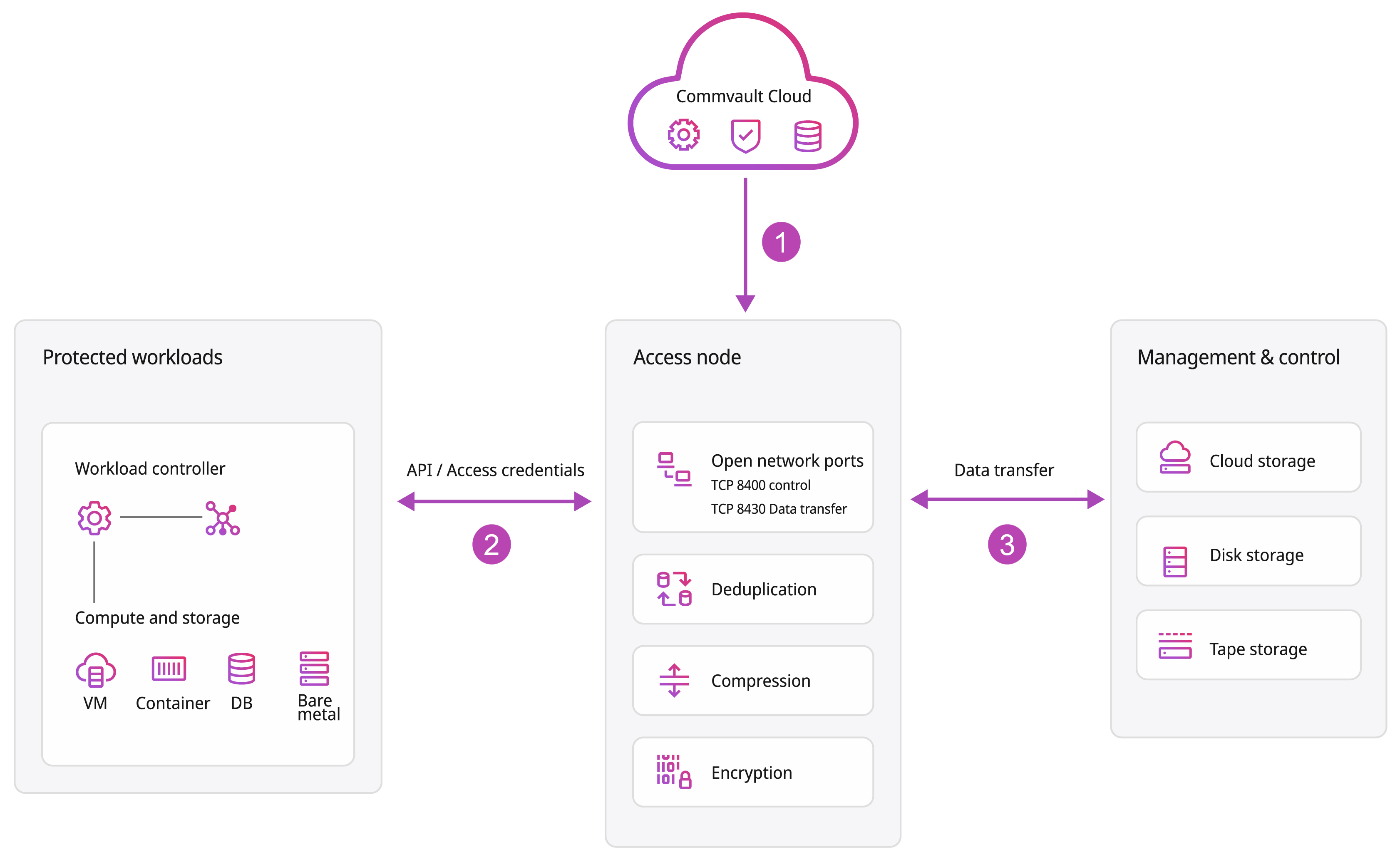
Commvault uses a service-based architecture where components communicate over secure, outbound-first connections to perform backup, restore, and management operations.

Use this page to understand baseline connectivity patterns and configure firewall rules without opening unnecessary ports. For ports and protocols for specific workloads (such as VMware, databases, and NAS), see the workload documentation.

How communication works

Understanding how components communicate helps you configure firewall rules correctly and avoid over-permissive or incomplete configurations.

Commvault communication follows these principles:

  • Most connections are outbound from your environment.

  • Components communicate over secure HTTPS (TCP 443) whenever possible.

  • Data transfer paths can differ between backups and restores.

  • Some scenarios require direct communication between components for data transfer.

Control plane and data plane

Commvault separates communication into these traffic types:

  • Control plane traffic: Authentication, job orchestration, and configuration. This traffic typically uses HTTPS (TCP 443).

  • Data plane traffic: Backup and restore data transfer. Ports and protocols vary by deployment and workload.

In Commvault SaaS, your resources and access nodes initiate outbound connections to Commvault services.

In most environments:

  • Control traffic is outbound over HTTPS (TCP 443).

  • Backup data is sent to the configured cloud storage destination.

  • Inbound firewall rules are uncommon, but you might need them depending on where the initiating component runs and what you’re protecting.

In Commvault software, components such as clients, MediaAgents, and the control plane communicate with each other.

In most environments:

  • Some connections are initiated by clients.

  • Some connections are initiated by infrastructure components (for example, MediaAgents during restore operations).

  • You must allow communication between components based on your architecture and which component initiates each connection.

Key concepts

  • Directionality

    • Outbound: Initiated from your environment to another system.

    • Inbound: Initiated from another system into your environment. Inbound rules are uncommon, but you might need them for some restore paths and architectures.

  • Initiation: For each connection, one component initiates communication. Firewall rules must allow traffic in the correct direction for the initiating component.

  • Conditional connectivity: Some connections are required only in specific cases, such as:

    • During backup operations

    • During restore operations

    • When specific features are enabled

Common connectivity patterns

This section describes typical communication patterns so you can validate that required network paths exist.

Backup traffic patterns

Backups typically use these paths:

  • An infrastructure component connects to the workload to read data (for example, an access node, MediaAgent, or client, depending on the workload).

  • Control traffic flows between the initiating component and the control plane.

  • Backup data flows from the data source to the configured storage destination.

In most Commvault SaaS environments:

  • The access node initiates connections to protected resources.

  • The access node communicates with Commvault services over HTTPS (TCP 443).

  • Backup data is transferred to cloud storage using the storage provider’s endpoints.

What varies by workload:

  • The ports and protocols required between the access node and the protected resource.

In most Commvault software environments:

  • The client and/or MediaAgent coordinates backup operations.

  • Backup data is written to storage using the configured data transfer ports.

What varies by environment:

  • Which component initiates the connection to the data source.

  • The data transfer port range you configure for your firewall model.

Restore traffic patterns

Restores often require different connectivity than backups because the initiating component and the direction of data transfer can change.

In most Commvault SaaS environments:

  • The access node retrieves backup data from storage.

  • The access node initiates a connection to the restore target.

  • Data is transferred back to the target resource.

What varies by workload:

  • The ports and protocols required between the access node and the restore target.

In most Commvault software environments:

  • The MediaAgent reads backup data from storage.

  • The MediaAgent transfers data to the client or restore target.

Guardrail:

  • Restores can fail even if backups succeed when inbound rules block a restore-initiated connection.

Baseline network requirements

Use these baseline requirements as your starting point. Then add workload-specific requirements based on what you’re protecting.

Outbound connectivity

  • Allow outbound HTTPS (TCP 443) to:

    • Commvault services

    • Any cloud or SaaS endpoints required by the workloads and storage you use

  • Allow DNS resolution for the service hostnames you allow.

Endpoint allowlisting

If you restrict outbound traffic, plan allowlists around these endpoint types:

  • Commvault service endpoints used for authentication, job control, and service-to-service communication

  • Storage endpoints used to read and write backup data

  • Workload vendor endpoints for API-driven workloads (for example, SaaS applications and public cloud services)

Guidelines:

  • Prefer allowlisting by FQDN where your firewall supports it.

  • If you must allowlist by IP:

    • Expect IP ranges to change over time for many cloud and SaaS providers.

    • Treat IP allowlists as operational items that you review and update regularly.

  • If you use URL filtering, make sure it doesn’t block required hostnames or break required redirects during sign-in flows.

HTTP proxy considerations

Some environments route outbound traffic through an HTTP proxy.

Guidelines:

  • If you use a proxy, make sure the initiating component can reach:

    • Commvault services over HTTPS (TCP 443)

    • Workload and storage endpoints required for your configuration

  • If your proxy supports TLS interception, review the inspection guidance on this page.

  • If you protect resources that are reachable only on private networks, make sure proxy routing doesn’t prevent direct connectivity to those private endpoints.

Routing and segmentation guardrails

Ports aren’t enough if there’s no network path between components.

Verify that your network design allows:

  • Layer 3 routing between the initiating component and the workload (for example, VPC/VNet peering, VPN, or on-prem routing).

  • Return-path connectivity for the same flow (asymmetric routing can break long-lived sessions).

  • Required connectivity across network segments used during restores (restore targets often differ from backup sources).

Workload connectivity

Allow the component that initiates the operation (for example, an access node or MediaAgent) to reach the workload over the workload’s required ports and protocols.

Examples of workload-specific connectivity:

  • VMware vSphere: Web services (HTTPS) plus VMware data-transfer ports (such as TCP 902, depending on your environment)

  • Databases: The database listener port (for example, SQL Server, Oracle, PostgreSQL, MySQL)

  • NAS: SMB/CIFS or NFS ports and any required directory services connectivity

Tip

If you’re troubleshooting connectivity, validate in this order:

  1. DNS name resolution works.

  2. HTTPS (TCP 443) to Commvault services works.

  3. The initiating component can reach the workload over the workload’s required ports.

  4. The initiating component can reach the storage endpoints.

Data transfer port range (Commvault software only)

Backup and restore operations typically use a configurable data transfer port range.

If you have restrictive firewalls:

  • Configure a fixed port range.

  • Make sure the range is large enough for the number of concurrent jobs you expect.

Keep port configurations consistent across nodes that communicate with each other.

Firewall and inspection guidance

Misconfigured inspection and filtering are common causes of connectivity problems.

Avoid interception that breaks TLS

Avoid configurations that can interfere with secure communication, such as:

  • SSL/TLS inspection

  • Deep packet inspection that modifies traffic

  • Overly strict URL filtering that blocks required service endpoints

If you must use inspection:

  • Scope it carefully and test both backup and restore paths.

  • Make sure the initiating component trusts the inspection certificate chain.

Certificate and trust considerations

Connectivity can fail even when ports are open if certificates can’t be validated.

Examples:

  • A trusted root or intermediate certificate is missing on the initiating component.

  • A certificate has expired and the connection fails during TLS negotiation.

  • A hostname mismatch occurs because traffic is redirected or rewritten by an intermediary device.

Common connectivity problems

  • Backups succeed but restores fail because restore-initiated connections are blocked.

  • Firewall rules allow control traffic but block data transfer paths.

  • Port ranges are too small for concurrent jobs.

  • TLS interception causes authentication or session failures.

  • Egress allowlists don’t include all required service endpoints.

  • Routing or segmentation blocks the network path even when ports are open.

  • Certificate trust issues prevent TLS connections even when inspection is not enabled.

×

Loading...